> ## Documentation Index
> Fetch the complete documentation index at: https://docs.bawabah.app/llms.txt
> Use this file to discover all available pages before exploring further.
# Quick Start
> Start Building Quickly, with minimal setup needed.
Start By Creating an app on [bawabah.app](https://bawabah.app).
Implement Bawabah in your website by using our Hosted Login page or Login Form.
Capture users' data after they login to your site with Bawabah.
## Create Your First App
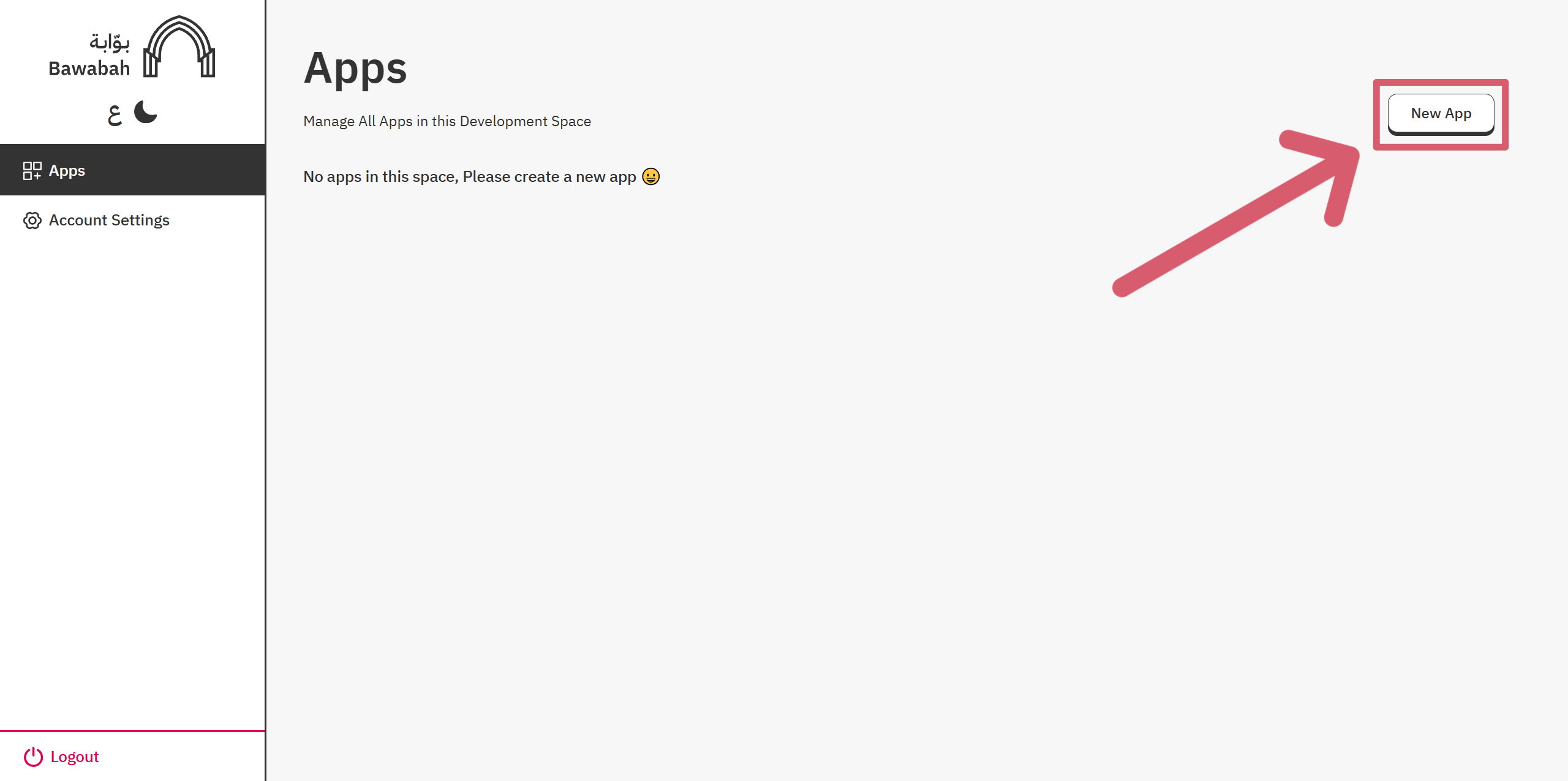
1. Login to your Bawabah Developer Account: [https://bawabah.app/dev/login](https://bawabah.app/dev/login).
2. Click "New App" button to create a new App.
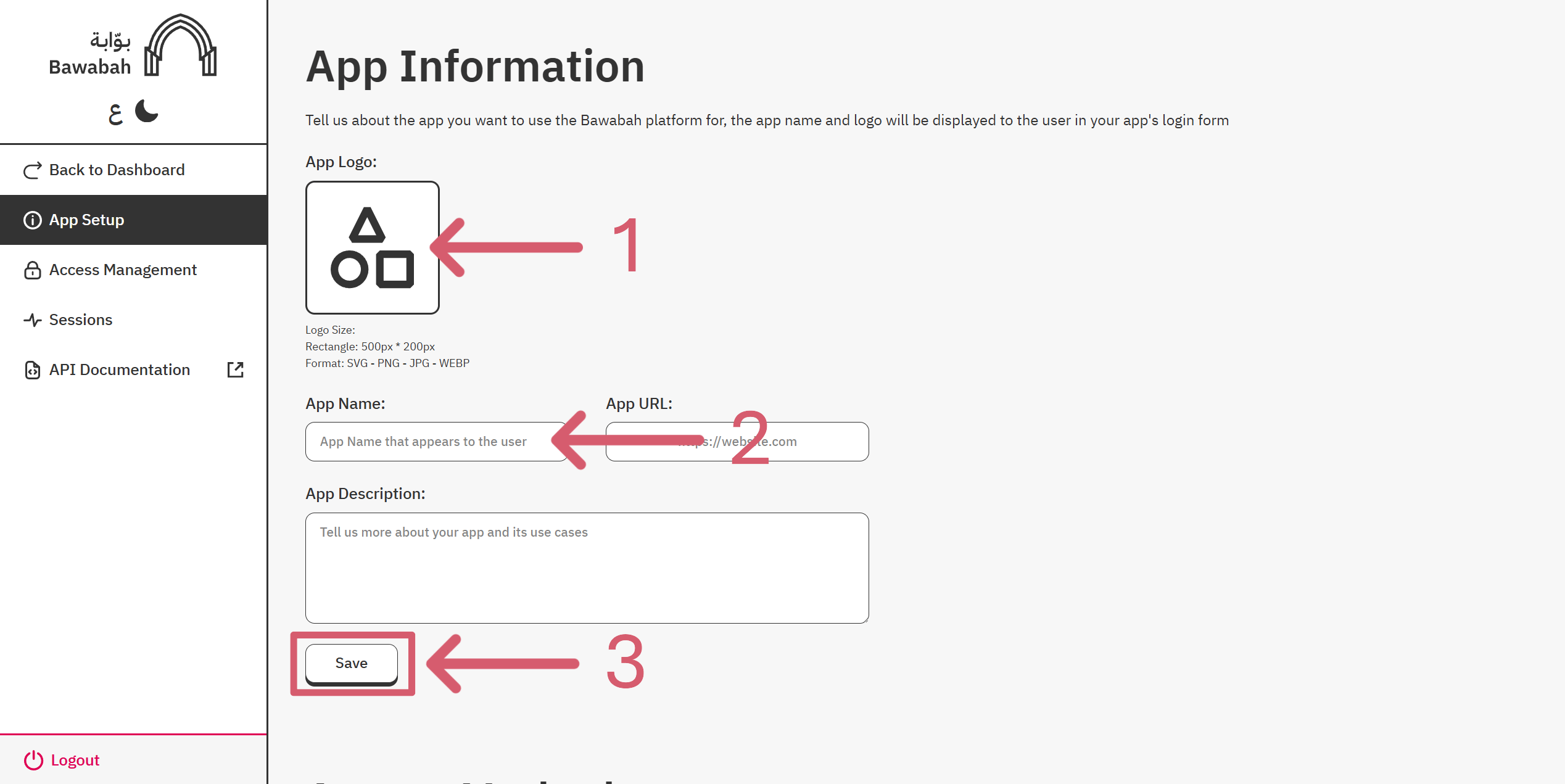
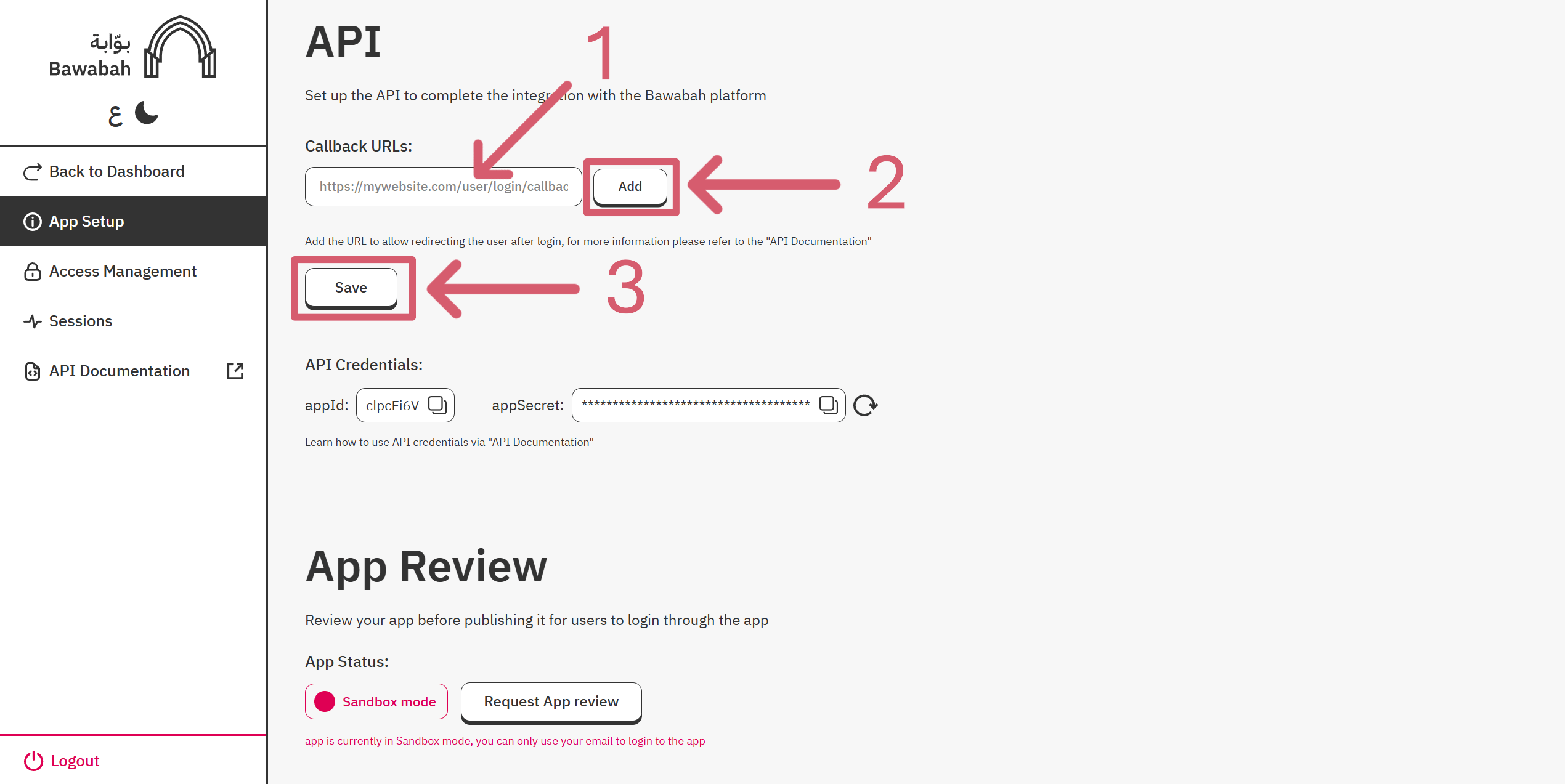
 3. Set up Your App by adding **App Logo** and **App Name**, and Add At least 1 **callback URL**.
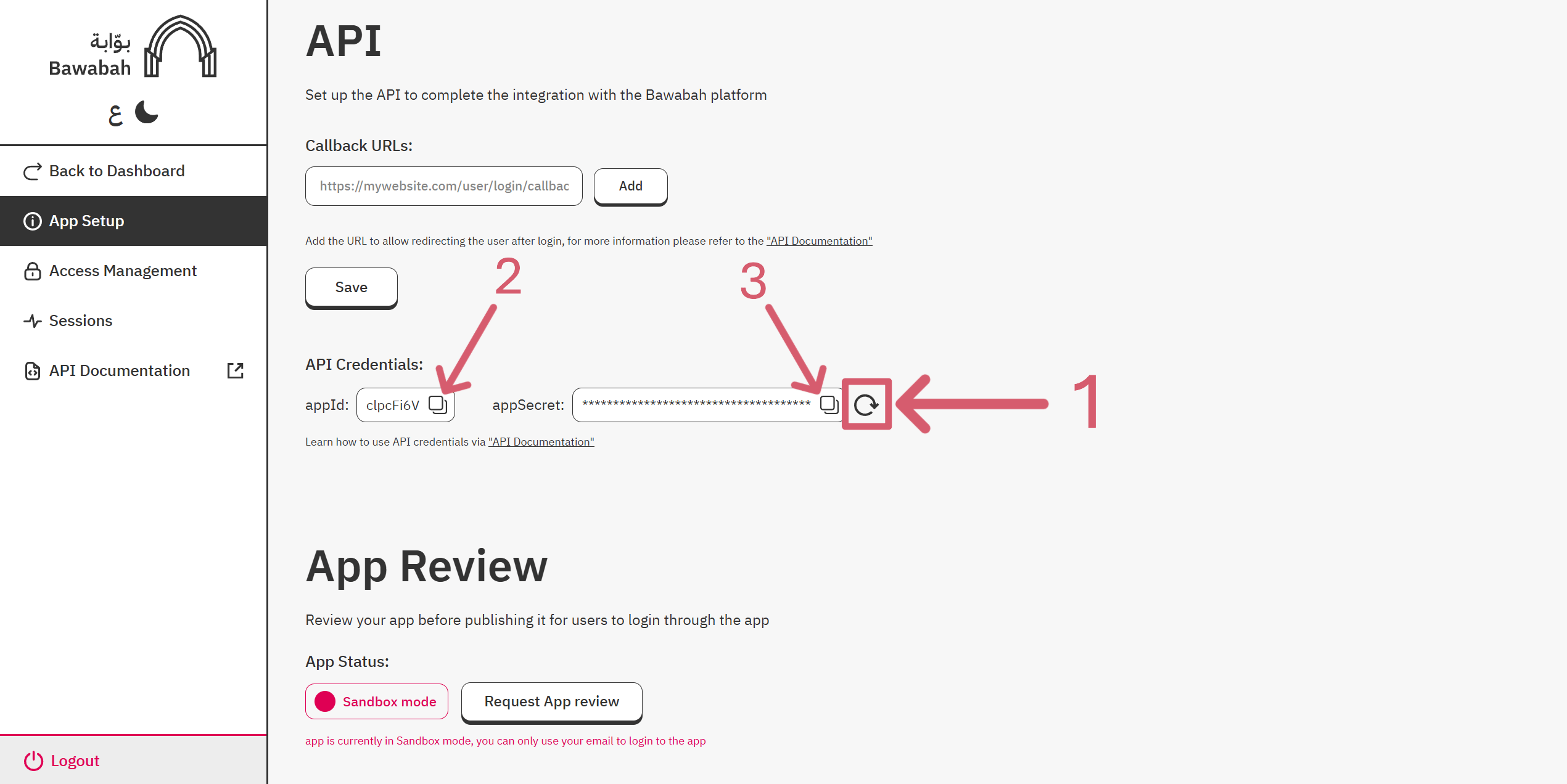
 4. Regenerate your AppSecret, then copy appId and appSecret For Later Use.
 When you create a new app, your app will be in Sandbox Mode, meaning only the developer or test users, if any, can log in with their email. To make your app accessible to the public, remember to request App Review after completing your app integration.
## Front-end
There are two ways to use Bawabah in your project:
A login page hosted on Bawabah website redirects user to your website after login.
A login form can be used anywhere on your website.
### Setup Hosted Login
Edit the URL below to access your login hosted page:
```
https://bawabah.app/login?appId={your-app-id}&callbackUrl={your-callback-url}&fullscreen=true
```
> Replace `{your-app-id}` with your appId and `{your-callback-url}` with your callback URL From [Create Your First App](/getting-started/en/quickstart#create-your-first-app) Step.
When users click the login button on your website, they are redirected to the hosted login page URL. After completing the login process, they will be redirected back to your website via the callback URL, which includes a `sessionId` query parameter for the user session to capture.
**For Example:**\
If your appId is `4y83w4f` And your callback URL is `https://mywebsite.com/login/callback` Then the hosted login URL will be `https://bawabah.app/login?appId=4y83w4f&callbackUrl=https://mywebsite.com/login/callback&fullscreen=true`
### Setup Form Login
If you followed the last step ([**Setup Hosted Login**](#setup-hosted-login)) no need to set up a login form. Alternatively, if you wish to host the login form on your own website, you can follow the guide on [**Form Login**](/development/en/form).
## Back-end
In case you use a language other than Node.js or you prefer to integrate with Bawabah API manually, please refer to our [API Reference.](/api-reference/en)
### Install Bawanah Library
First, we have to install Bawabah Library from NPM ([https://www.npmjs.com/package/bawabah](https://www.npmjs.com/package/bawabah)) using the command:
```
npm i bawabah
```
After installing the npm Package, we can start using it immediately:
```typescript index.ts theme={"dark"}
// Import Bawabah Library
import Bawabah from 'bawabah';
// Initialize Bawabah with your credentials
const bw = new Bawabah();
bw.init({
appId: "your-app-id",
appSecret: "your-app-secret"
});
```
```javascript index.js theme={"dark"}
// Import Bawabah Library
const Bawabah = require('bawabah');
// Initialize Bawabah with your credentials
const bw = new Bawabah();
bw.init({
appId: "your-app-id",
appSecret: "your-app-secret"
});
```
> Replace `{your-app-id}` with your appId and `{your-app-secret}`with your appSecret From [Create Your First App](/getting-started/en/quickstart#create-your-first-app) Step.
### Create Callback Route
Now we will create the callback route to capture the user session. In this example, we will use Express.js to create the route, then capture the user session with the `capture()` function:
But before that, we need to install Express.js using this command:
```
npm i express
```
```typescript index.ts theme={"dark"}
// Import Express and Bawabah Library
import express from 'express';
import Bawabah from 'bawabah';
// Initialize Bawabah with your credentials
const bw = new Bawabah();
bw.init({
appId: "your-app-id",
appSecret: "your-app-secret"
});
// Create Express app
const app = express();
const PORT = process.env.PORT || 3000;
// Callback route for Bawabah redirect
app.get('/login/callback', async (req, res) => {
const sessionId = req.query.sessionId as string; // Get Session Id from Query /login/callback?sessionId=abc123
// Capture user session from Bawabah
const result = await bw.capture(sessionId);
console.log(result); // Log User Data -- for Debugging --
res.json({ loggedIn: true });
});
// Start the Express server
app.listen(PORT, () => {
console.log(`Server running on http://localhost:${PORT}`);
});
```
```javascript index.js theme={"dark"}
// Import Express and Bawabah Library
const express = require('express');
const Bawabah = require('bawabah');
// Initialize Bawabah with your credentials
const bw = new Bawabah();
bw.init({
appId: "your-app-id",
appSecret: "your-app-secret"
});
// Create Express app
const app = express();
const PORT = process.env.PORT || 3000;
// Callback route for Bawabah redirect
app.get('/login/callback', async (req, res) => {
const sessionId = req.query.sessionId; // Get Session Id from Query /login/callback?sessionId=abc123
// Capture user session from Bawabah
const result = await bw.capture(sessionId);
console.log(result); // Log User Data -- for Debugging --
res.json({ loggedIn: true });
});
// Start the Express server
app.listen(PORT, () => {
console.log(`Server running on http://localhost:${PORT}`);
});
```
Finally, after testing the implementation, we can add our Login/Signup logic and wrap the code in a try/catch block to catch any errors:
```typescript index.ts theme={"dark"}
// Import Express and Bawabah Library
import express from 'express';
import Bawabah from 'bawabah';
// Initialize Bawabah with your credentials
const bw = new Bawabah();
bw.init({
appId: "your-app-id",
appSecret: "your-app-secret"
});
// Create Express app
const app = express();
const PORT = process.env.PORT || 3000;
// Callback route for Bawabah redirect
app.get('/login/callback', async (req, res) => {
const sessionId = req.query.sessionId as string; // Get Session Id from Query /login/callback?sessionId=abc123
if (!sessionId) {
// If sessionId is missing, return a 400 error
return res.status(400).send('Missing sessionId in query');
}
try {
// Capture user session from Bawabah
const result = await bw.capture(sessionId);
// --- Perform Your User Login/Signup Logic here ---
res.status(200).json({ loggedIn: true });
} catch (err) {
// If Bawabah API Respond with an Error, return a 500 error to the user with details
res.status(500).json({ error: 'Failed to capture session', details: err });
}
});
// Start the Express server
app.listen(PORT, () => {
console.log(`Server running on http://localhost:${PORT}`);
});
```
```javascript index.js theme={"dark"}
// Import Express and Bawabah Library
const express = require('express');
const Bawabah = require('bawabah');
// Initialize Bawabah with your credentials
const bw = new Bawabah();
bw.init({
appId: "your-app-id",
appSecret: "your-app-secret"
});
// Create Express app
const app = express();
const PORT = process.env.PORT || 3000;
// Callback route for Bawabah redirect
app.get('/login/callback', async (req, res) => {
const sessionId = req.query.sessionId; // Get Session Id from Query /login/callback?sessionId=abc123
if (!sessionId) {
// If sessionId is missing, return a 400 error
return res.status(400).send('Missing sessionId in query');
}
try {
// Capture user session from Bawabah
const result = await bw.capture(sessionId);
// --- Perform Your User Login/Signup Logic here ---
res.status(200).json({ loggedIn: true });
} catch (err) {
// If Bawabah API responds with an error, return a 500 error to the user with details
res.status(500).json({ error: 'Failed to capture session', details: err.message || err });
}
});
// Start the Express server
app.listen(PORT, () => {
console.log(`Server running on http://localhost:${PORT}`);
});
```
**Need help?** Join our [community](https://discord.gg/9YpqwdNpxy).
## Discover more
Continue discovering Bawabah:
Leading Login Solution.
Customize Bawabah login form on your website.
Connect to Bawabah API.
Code implementation Examples.
When you create a new app, your app will be in Sandbox Mode, meaning only the developer or test users, if any, can log in with their email. To make your app accessible to the public, remember to request App Review after completing your app integration.
## Front-end
There are two ways to use Bawabah in your project:
A login page hosted on Bawabah website redirects user to your website after login.
A login form can be used anywhere on your website.
### Setup Hosted Login
Edit the URL below to access your login hosted page:
```
https://bawabah.app/login?appId={your-app-id}&callbackUrl={your-callback-url}&fullscreen=true
```
> Replace `{your-app-id}` with your appId and `{your-callback-url}` with your callback URL From [Create Your First App](/getting-started/en/quickstart#create-your-first-app) Step.
When users click the login button on your website, they are redirected to the hosted login page URL. After completing the login process, they will be redirected back to your website via the callback URL, which includes a `sessionId` query parameter for the user session to capture.
**For Example:**\
If your appId is `4y83w4f` And your callback URL is `https://mywebsite.com/login/callback` Then the hosted login URL will be `https://bawabah.app/login?appId=4y83w4f&callbackUrl=https://mywebsite.com/login/callback&fullscreen=true`
### Setup Form Login
If you followed the last step ([**Setup Hosted Login**](#setup-hosted-login)) no need to set up a login form. Alternatively, if you wish to host the login form on your own website, you can follow the guide on [**Form Login**](/development/en/form).
## Back-end
In case you use a language other than Node.js or you prefer to integrate with Bawabah API manually, please refer to our [API Reference.](/api-reference/en)
### Install Bawanah Library
First, we have to install Bawabah Library from NPM ([https://www.npmjs.com/package/bawabah](https://www.npmjs.com/package/bawabah)) using the command:
```
npm i bawabah
```
After installing the npm Package, we can start using it immediately:
```typescript index.ts theme={"dark"}
// Import Bawabah Library
import Bawabah from 'bawabah';
// Initialize Bawabah with your credentials
const bw = new Bawabah();
bw.init({
appId: "your-app-id",
appSecret: "your-app-secret"
});
```
```javascript index.js theme={"dark"}
// Import Bawabah Library
const Bawabah = require('bawabah');
// Initialize Bawabah with your credentials
const bw = new Bawabah();
bw.init({
appId: "your-app-id",
appSecret: "your-app-secret"
});
```
> Replace `{your-app-id}` with your appId and `{your-app-secret}`with your appSecret From [Create Your First App](/getting-started/en/quickstart#create-your-first-app) Step.
### Create Callback Route
Now we will create the callback route to capture the user session. In this example, we will use Express.js to create the route, then capture the user session with the `capture()` function:
But before that, we need to install Express.js using this command:
```
npm i express
```
```typescript index.ts theme={"dark"}
// Import Express and Bawabah Library
import express from 'express';
import Bawabah from 'bawabah';
// Initialize Bawabah with your credentials
const bw = new Bawabah();
bw.init({
appId: "your-app-id",
appSecret: "your-app-secret"
});
// Create Express app
const app = express();
const PORT = process.env.PORT || 3000;
// Callback route for Bawabah redirect
app.get('/login/callback', async (req, res) => {
const sessionId = req.query.sessionId as string; // Get Session Id from Query /login/callback?sessionId=abc123
// Capture user session from Bawabah
const result = await bw.capture(sessionId);
console.log(result); // Log User Data -- for Debugging --
res.json({ loggedIn: true });
});
// Start the Express server
app.listen(PORT, () => {
console.log(`Server running on http://localhost:${PORT}`);
});
```
```javascript index.js theme={"dark"}
// Import Express and Bawabah Library
const express = require('express');
const Bawabah = require('bawabah');
// Initialize Bawabah with your credentials
const bw = new Bawabah();
bw.init({
appId: "your-app-id",
appSecret: "your-app-secret"
});
// Create Express app
const app = express();
const PORT = process.env.PORT || 3000;
// Callback route for Bawabah redirect
app.get('/login/callback', async (req, res) => {
const sessionId = req.query.sessionId; // Get Session Id from Query /login/callback?sessionId=abc123
// Capture user session from Bawabah
const result = await bw.capture(sessionId);
console.log(result); // Log User Data -- for Debugging --
res.json({ loggedIn: true });
});
// Start the Express server
app.listen(PORT, () => {
console.log(`Server running on http://localhost:${PORT}`);
});
```
Finally, after testing the implementation, we can add our Login/Signup logic and wrap the code in a try/catch block to catch any errors:
```typescript index.ts theme={"dark"}
// Import Express and Bawabah Library
import express from 'express';
import Bawabah from 'bawabah';
// Initialize Bawabah with your credentials
const bw = new Bawabah();
bw.init({
appId: "your-app-id",
appSecret: "your-app-secret"
});
// Create Express app
const app = express();
const PORT = process.env.PORT || 3000;
// Callback route for Bawabah redirect
app.get('/login/callback', async (req, res) => {
const sessionId = req.query.sessionId as string; // Get Session Id from Query /login/callback?sessionId=abc123
if (!sessionId) {
// If sessionId is missing, return a 400 error
return res.status(400).send('Missing sessionId in query');
}
try {
// Capture user session from Bawabah
const result = await bw.capture(sessionId);
// --- Perform Your User Login/Signup Logic here ---
res.status(200).json({ loggedIn: true });
} catch (err) {
// If Bawabah API Respond with an Error, return a 500 error to the user with details
res.status(500).json({ error: 'Failed to capture session', details: err });
}
});
// Start the Express server
app.listen(PORT, () => {
console.log(`Server running on http://localhost:${PORT}`);
});
```
```javascript index.js theme={"dark"}
// Import Express and Bawabah Library
const express = require('express');
const Bawabah = require('bawabah');
// Initialize Bawabah with your credentials
const bw = new Bawabah();
bw.init({
appId: "your-app-id",
appSecret: "your-app-secret"
});
// Create Express app
const app = express();
const PORT = process.env.PORT || 3000;
// Callback route for Bawabah redirect
app.get('/login/callback', async (req, res) => {
const sessionId = req.query.sessionId; // Get Session Id from Query /login/callback?sessionId=abc123
if (!sessionId) {
// If sessionId is missing, return a 400 error
return res.status(400).send('Missing sessionId in query');
}
try {
// Capture user session from Bawabah
const result = await bw.capture(sessionId);
// --- Perform Your User Login/Signup Logic here ---
res.status(200).json({ loggedIn: true });
} catch (err) {
// If Bawabah API responds with an error, return a 500 error to the user with details
res.status(500).json({ error: 'Failed to capture session', details: err.message || err });
}
});
// Start the Express server
app.listen(PORT, () => {
console.log(`Server running on http://localhost:${PORT}`);
});
```
**Need help?** Join our [community](https://discord.gg/9YpqwdNpxy).
## Discover more
Continue discovering Bawabah:
Leading Login Solution.
Customize Bawabah login form on your website.
Connect to Bawabah API.
Code implementation Examples.